Wednesday, May 26, 2010

A LA CART


So you want to become a podcasting superstar. With enthusiastic dynamism you have embraced all the latest computer technology. Now, at your fingertips, you have the ability to produce your show from your bedroom or local coffee hang. There is one slight problem, you yearn for the "Old School" way of production. Admit it, you wish you could carry around your old trusty cart machine. Retro is cool and we understand your need to get in touch with vintage greatness

Well, if you where born after 1982 you may not be familiar with cart technology, as well as, 8 track, cassette, and vinyl records, as these are all "Old School" artifacts of the trade. Soon to be in the same class is the Instant Replay, the modern cart replacement for radio folks. It's fast, easy and powerful, however, too expensive for a homegrown podcast.

All you need now is your laptop, a mic, and an inexpensive software replacement for the Instant Replay. For you Mac users out there, for just $29 bucks, you can snag Soundboard from Ambrosia Software. With Soundboard you can add your special gloss to your podcasts or broadcasts. Add sound clips, special effects, music, backgrounds, stingers, bumpers, laugh tracks... etc. Create your own libraries of show specific audio clips and fire them off with a hot key from your keyboard. Tap the key and you have just replicated your beloved cart. Soundboard is designed to be easy to use while performing live. You can also edit sounds, drag and drop, and control Soundboard via a MIDI device.

Ambrosia Software has video overviews to get you up and running on their web site.

http://www.ambrosiasw.com

Monday, May 24, 2010

SLIPKNOT BASS PLAYER FOUND DEAD


Urbandale police say a hotel employee found 38-year-old Paul Dedrick Gray dead in a room at the Town Plaza Hotel. Foul play wasn't suspected. The Polk County Medical Examiner's Office plans an autopsy Tuesday.

Most Slipknot members grew up in the Des Moines area. The band, known for its grotesque masks, released its first album in 1999. It sold more than 1 million copies.

For our Ripped users, we have posted an imaging piece relevant to the announcement. You'll find it on the main page as a media buzz cut.

Tuesday, May 18, 2010

ROCKET SCIENCE REFRESHED


We're clicking around the back end of the website to do a nip/tuck on RS. It was time to refresh categories and get the site ready for the new creative that's coming. As Hot AC changes, RS will change with it, this is the beginning of another stage of evolution.

The simple and fast functionality will stay the same, only the organization will change. We'll be making a tutorial video to walk you through the refreshed layout. Keep watching the Bagazine for more details coming soon.

Monday, May 17, 2010

RONNIE JAMES DIO DEAD AT 67


Just say"Dio" and people know what you're talking about. He made an impression far beyond the world of metal. This link to an NY Times article includes several videos that help illustrate his influence.

http://artsbeat.blogs.nytimes.com/2010/05/17/the-lighter-side-of-ronnie-james-dio/

Tuesday, May 11, 2010

INDY 500 MUSIC


Memorial Day weekend is just around the corner, and that means it’s time to fire up that Indy 500 production. To get ourselves in the mood, here are some tracks we are listening to while watching Danica Patrick and Milka Duno fight on youtube.

http://youtube.com/watch?v=frcOogBzSY8

This list should also make for a good soundtrack while trying to pass that swervedriver in the Mini-van on the way to the liquor store.

Jimi Hendrix – Crosstown Traffic
Alice Cooper – Under My Wheels
Audioslave - Gasoline
Buckcherry – On the Road Again
Cake –Going The Distance
Chuck Berry – Riding Around in my Automobile
Deep Purple - Highway Star
Fear Factory – Cars
Fuel –Metallica
Gary Numan – Cars
George Jones – The Race Is On
Golden Earring – Radar Love
Jimi Hendrix – Crosstown Traffic
Ministry – Jesus Built My Hotrod
Motely Crue – Kickstart My Heart
Paul Oakenfold – Speed
Primus - Jerry Was A Race Car Driver
Ratt – Round and Round
Sammy Hagar – I Can’t Drive 55
Slayer – Born To Be Wild
Static-X – Speedway
Steppenwolf – Born To Be Wild
The Beatles – Drive my Car
The Cars – Drive
The Prodigy – Speedway
War – Low Rider
White Lion – Radar Love
White Zombie – Thunder Kiss ‘65
Willie Nelson – On the Road Again

Friday, May 7, 2010

SUMMING MIXERS


Awhile back, we tested 3 summing mixers. We don't want to get into brand names because we don't want to do a shootout. We just want to get some info out there because summing mixers are growing in sales while being the topic of much debate.

First the concept behind the gear. Summing mixers are supposed to help your daw audio sound more like it has gone through an analog console. Your audio is sent through analog circuitry to add warmth but, it's also bypassing your digital summing pipe so you can get better stereo imaging. Some boxes do only that while others claim to add some color to your sound, maybe a little beef on the bottom etc.

Second, our test. It's not so simple to do an accurate test to see exactly what the mixer does compared to your in-the-box mix. The web is loaded with controversy about it and it can be confusing. We talked to reps from the companies to make sure we were using the boxes properly. We chose one inexpensive brand, one middle priced and one high end. All units performed 8 channel summing.

Third, the result. We noticed a difference in sound with all 3 units, however, all of us here at the bag didn't always agree that the difference was an improvement. Overall, the difference was small and sometimes hard to detect. With a little more investigation we found that summing really becomes more significant at 16 channels and beyond. Imagine a 48 channel console. The cumulative effect of all those channels is really where the magic is. For project studios with less than 16 channels of output to be summed, you may find results that leave you wanting more for the money you spent.

More companies are coming out with summing mixers since they've been a hot item and maybe the technology will improve for 8 channel capacity so, this could be an interesting category to watch.

Thursday, May 6, 2010

WHAT IS PPM READY?


Not long ago, the buzz phrase we we're all hearing was "HD ready". Mp3 files were rumored to soon be obsolete in the HD world. Production services were scrambling to position themselves as HD ready. Now, that phrase is clinically dead and ppm ready is the heavyweight champ of radio hyperbole.

What does it mean? How do you get there? Honestly, no one really knows. Stations that have done well in the ppm markets have perhaps done so by default. The technology appears to favor certain formats although not consistently. Programmers and staffers are baffled and from what we hear, the story on ppm changes frequently. It's a moving target. Of course, flatly admitting you don't know what's happening or where things are going is scary and unpopular. So, what do you do?

We're not armed with magic bullets but, we can offer an opinion. We think great radio works regardless of measurement methodology. Compelling is compelling right? Did Rush Limbaugh pack up and go home because he heard ppm favors music intensive pop formats? He knows better and so do his advertisers. Content is still king. If you're providing original, compelling radio everyday, pirates can't touch you and the people meter can't kill you. That's our opinion. If we're wrong, get ready for Hot AC on every frequency, every minute of every day.

Wednesday, May 5, 2010

MINING RADIO GOLD


Good or bad, radio is changing. We certainly don’t sit around a wooden box with our families and listen to the radio to our favorite programs anymore. Computers pretty much run the show now (literally) and a lot of the radio we listen to is piped through a mobile phone or some other wi-fi or 3G gadget. But every so often, it’s good for us to look back and see where it all came from. We’ve compiled a list of places you can online to listen to various shows, commercials and other content from the Golden Age of Radio.

Old iTunes commercials – a glimpse into what products were being advertised and how they advertised them (downloads are $0.99 but you can listen to the ads in their entirety for free – link will open iTunes app) - http://itunes.apple.com/us/album/old-time-radio-commercials/id271694368

Radio Lovers - Old Time Radio programs of all sorts including Amos & Andy, Bob Hope and Benny Goodman - http://www.radiolovers.com/

OTR (Old TimeRadio) - Old radio commercials sorted by year starting in the early 20’s up to the 50’s http://www.old-time.com/commercials/

Old Timer Radio Fans – Another place to listen to retro ads from the 50’s and earlier http://www.oldtimeradiofans.com/old_radio_commercials/1957_Chevrolet.php

Wednesday, April 28, 2010

CREATING PRO TOOLS TEMPLATES


If you’re constantly re-setting up groups, using the same eq settings for your VO in Pro Tools or any DAW for that matter it’s time to set up a master template. Even if your not grouping, having audio tracks already created with your “go to “ eq ready and your favorite limiter across the stereo buss can save you loads of time whn you add up all the productions you do in a week. I like to route my sfx and drops through a group and apply separate eq and compression to that and if I have more than one VO element run a separate group for that. The same applies to any multiple music tracks as in a hook promo.
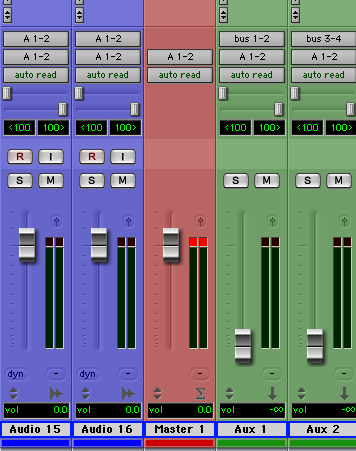
If you’ve never set up a group before basically you assign the outputs of the tracks you want to group to a buss (e.g., buss 1 & 2) Create an Aux track and assign the inputs of it to buss 1 & 2, and the outputs of the Aux track to Stereo 1&2 (which feeds the Master fader). Any eq or compression or fx you want to apply to just those in the group you insert across the newly created Aux channel. It also makes it easier to mix if for instance you need to raise the level of all your Music elements.
Once you’ve created your template, choose “Save As” Name the session (e.g. Master template) and click Save. In the Mac finder locate the session and click on it once to select it and press” Command I” or right click it and select “Get Info”. Select the Stationary Pad option, select the locked option and close the window. When you open the template it will ask you whether you want to edit the stationary pad (in case you want to edit your template) or start a new session with your saved template. Click “New Session” which saves a copy of the template for you to work on.

Friday, April 23, 2010

HAPPY BELATED EARTH DAY


We were busy recycling used mp3 files on Earth Day so we hope you'll forgive our tardiness. Here's a vid to help celebrate even though it's a little late.


biz markie

Tuesday, April 20, 2010

WOODPECKERS FROM SPACE


Cool retro sound design and wicked woodpecker rapping make this piece unforgettable.


Click here to see the video.

Monday, April 19, 2010

10 Easy steps to boost your Internet speed without buying stuff


We here at Brown Bag realize that slow internet speeds can get in the way of productivity. Especially when it comes to downloading the many thousands of cuts we have to offer. That’s why we want to show you 10 easy ways you can tweak your way to a faster internet experience.
1. Adjust your browser settings
Use Mozilla Firefox. Internet Explorer downloads all files on a web page in sequential order – Firefox does not, giving you a little bit o’ bandwidth savings. If you have to use IE make sure you have all the upgrades. If your on a Mac, try the latest Safari. It isn’t bad.
2. Call your friendly neighborhood ISP
In these tough economic times you might be able to negotiate a better internet package for a reasonable (or sometimes even the same) price. If not, talk to the boss about switching the service. There might be something faster and cheaper out there.
3. Tweak your router settings
Check your router’s manual. See if there are ports you can open up to help boost speed.
4. Keep the riff raff out
Make sure those slackers next door in studio B are not piggybacking on your wifi. If they are downloading movies, music or other large files on your wireless network, they can slow things down quite a bit. Encrypt your network with a password (again check your router manual for instructions on how to do this)
5. Trim the bandwidth fat.
A lot of apps like to secretly hog your internet connection behind the scenes. They start up when your computer boots and unless you really know what to look for, you’ll never know about it. Look for programs like Windows Update, Antivirus programs (use caution with this one – try updating manually at the end of your shift etc.), Real Player, MSN, Skype and others. Even when you are not running the app, they can still run your speed into the ground.
6. Get a better router
Ok so this one’s not free but it could save you a ton of time. The router that came from your ISP probably isn’t the fastest on the block. A lot of good routers are pretty cheap these days. But if it’s not in the cards, try placing your wireless router and modem in a place that’s not obstructed by walls, doors or other equipment.
7. Ditch your wireless
If possible, try connecting your computer directly to the router with an Ethernet cable. Keep in mind, the longer the cable, the slower your connection may be.
8. Get techy with it
This one’s for all you geeks out there but rookies…listen closely
Keep in mind this works on Windows only
Click Start-->Run-->type "gpedit.msc" without the "
This opens the group policy editor. Then go to: Local Computer Policy-->Computer Configuration-->Administrative Templates-->Network-->QOS Packet Scheduler-->Limit Reservable Bandwidth
Double click on Limit Reservable bandwidth. It will say it is not configured, but the truth is under the 'Explain' tab :
By default, the Packet Scheduler limits the system to 20 percent of the bandwidth of a connection, but you can use this setting to override the default.
So the trick is to ENABLE reservable bandwidth, then set it to ZERO. This should speed things up a bit.
10. Firefox Addons
There is a Firefox add on called DownloadThemAll. This thing lets you customize download settings and has a download accelerator that can bring you up to ludicrous speed.

Monday, April 12, 2010

MUSIC FOR TAX DAY


Here are some songs about money that might help get the ball rolling on some Tax Day themed production.

The Beatles “Tax Man”
The Beatles “Can’t Buy Me Love”
Dire Straits “Money for Nothing”
Johnny Paycheck “Me and the I.R.S.”
The Kinks “Sunny Afternoon”
John Lee Hooker “I Need Money”
Barrett Strong “Money (That’s what I want”)
Flying Lizards “Money (That’s what I want”)
Pink Floyd “Money”
Monty Python “Money Song”
Michael Jackson “Money”
Ray Charles “Busted”
Robert Cray Band “1040 Blues”
Spinal Tap “Gimme Some Money”

Sunday, April 11, 2010

AVID BUYS EUPHONIX


Lotsa buzz about this over the weekend. Here's a link to an article on marketwire.com that gives more info.


marketwire.com -avid buys euphonix

Wednesday, April 7, 2010

SMOOTH JAZZICA


Nothing says true fame more than Metallica performing hard rock in a smooth jazz style without their fans stoning them to death. What's next, a tour with Kenny G?


http://www.buzzfeed.com/awesomer/smoothjazzica

TUNE UP


A quick reminder...whenever you read a Bagazine post reviewing a piece of hardware or software, you can be sure that we used it before we tapped out the article. With that, let's talk tuning.

In the music biz, being in tune is a way of life. This little stomp box gem, PolyTune™ from TC Electronic makes it effortless.

Yeah yeah..... this is a guitar product but rest assured you can use a tuner across the entire musical spectrum, but you know this already. What is so cool about this one is, (guitar players get ready to tingle), PolyTune™ is a polyphonic tuner. You can see six strings at once!! This bad boy is a great chromatic tuner, a "chromatic champion" according to TC. You can set reference pitch to your preference and ranges from 435Hz to 445Hz. There are Poly, Needle, and Stream Modes that measure your input signal along with a "true bypass" mode when switching the tuner on and off. It also has a bass guitar mode for you 4 and 5 stringers out there.

If you like gear as much as we do and need an excuse or are jonesing for a new addition to your arsenal you cannot go wrong with a PolyTune™. The build quality is exceptional too.

Check out more at TC Electronic.

Monday, March 29, 2010

APRIL FOOL MUSIC LIST


I pity the fool that doesn’t have music for April Fools Day production!

With that in mind, here are some suggestions to get you started.

A Tribe Called Quest “Description of a Fool”
The Beatles “Fool on the hill”
Cinderella “Nobody’s Fool”
Deep Purple “You Fool No One”
Def Leppard “Foolin’”
Delfonics “Trying to make a fool of me”
The Doobie Brothers “What a fool believes”
Elvis Presley “Fool”
Foghat “Fool for the City”
Frank Sinatra “A day in the life of a fool”
Ludacris “Act a Fool”
Styx “Fooling Yourself”
Ween “You were the fool”
The Who “Won’t get fooled again”
World Party “Ship of Fools”

Friday, March 26, 2010

GOT A MATCH?


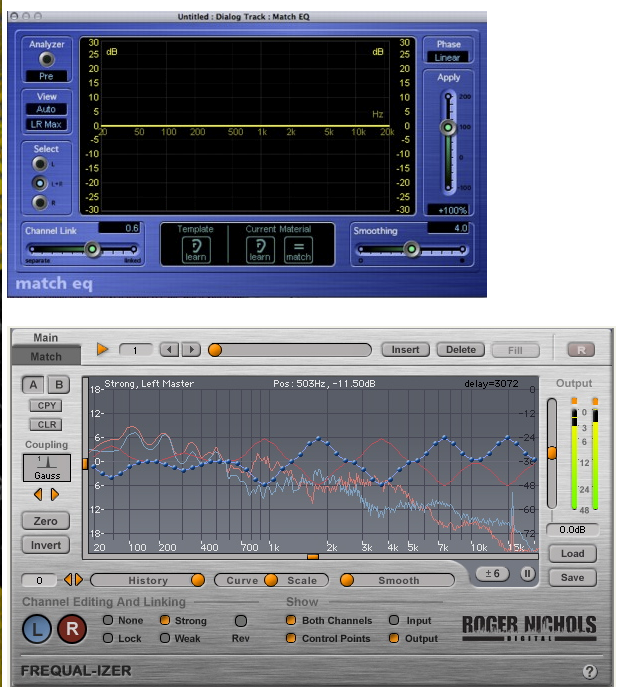
You are jamming to get your session finished and you are missing a certain "sound" to your project. You admit you are not an EQ guru and really don't have time to pull out your scalpel to do sonic surgery. You need a fix and you need it fast. Well, your EARS are the best tools to use of course, but in a jam, might we suggest an assist from a spectral analyzing or EQ matching plug-in.

If you don't know the ins and outs of equalization, you need to know some basics. What can we hear? Our ears only hear sounds in the range 20 Hertz to 20,000 KiloHertz (20 kHz), you may have seen or heard tech jabber like 20 to 20 or a 2 db (decibel) boost at 3500k etc. This all relates to the frequency range we hear and how we design, mix and edit our audio. In radio land we focus on 50Hz to 15kHz since broadcasters basically chop off the bottom and top of the spectral range when sending out the radio transmission. Only your dog will really miss the stuff above 15k anyway. With this very basic understanding you need to know that spectral analyzing or EQ matching is how certain software plug-ins can copy or mimic a preexisting EQ curve. The EQ curve is made up of points across the frequency range, 20Hz to 20kHz, that we can hear as it makes up a distinct sound or sonic effect. An example would be the sound coming from a small radio or earbuds. You recognize a nasal or thin sound that accompanies the small speaker output. Say the sound is more complicated or you need to match prerecorded tracks, spaces, sounds, and voice treatments etc. You should try the spectral / matching EQ solution for fast results. These can really save you time when trying to "dial in" the right EQ curves. You feed the plug-in the source that you would like to match and the software will generate a spectral/EQ analysis and apply that to your sound. Now you have a similar EQ curve at your disposal. Go ahead and apply the result to your sound or use it as a starting point to help you tailor your desired tone. Again, your ears and practicing with equalization are the sure fire way to achieve what you want. The matching EQ plug-ins are, however, very effective and can be a real time saver!

There are a few solutions out there. Some plug-ins are part of your DAW, like Match EQ in Apple's Logic Studio. Try the demos from iZotope: Ozone 4, Roger Nichols Digital: Frequal-izer, and Voxengo: CurveEQ.

These tools will really help you out of a jam. Remember, practice makes perfect.... always try your ears!

LINKS

http://www.apple.com/logicstudio

http://www.izotope.com/products/audio/ozone

http://www.rndigital.com/frequal-izer.html

http://www.voxengo.com/product/curveeq

Monday, March 22, 2010

KILLER BEATS


Ever wonder if that last drum or music loop you used in your last piece of production was legal? If you are throwing Acid loops into your projects and calling them your own, chances you are violating some copyright law or breeching a licensing contract/agreement of some kind. Don’t worry, we’re not here to rat you out, but we are going to do our best to keep you out of trouble and save you some time and your company some money. Using a little instrument in Ableton Live called Impulse may be the creative, simple and legal solution to beat processing you never knew you had.
Last April in this blog http://brownbagazine.blogspot.com/search?updated-max=2009-05-08T11%3A44%3A00-07%3A00&max-results=7) we showed you how to get your free copy of Ableton Live Lite. Now it’s time to get your money’s worth. With each free copy of Live comes the previously mentioned instrument, Impulse. It’s essentially a drum trigger that you populate with sounds/audio of your choosing. The Impulse module can be found in the browser window on the left side of the Ableton interface under “Live Devices”. Click on Impulse and right away you’ll see 8 empty boxes or slots surrounded by various parameters such as Decay, Volume, etc. All you do is drag a sample or audio file into any of the 8 empty boxes, adjust some volumes as needed and you’re pretty much ready to go. Record your midi info with a midi instrument or draw it yourself with the cursor. When you have your drum “kit” set up the way you like it, simply rename it and drag the module back into the browser under Impulse and all of your settings and sounds are saved for next time. If your company’s purse strings are so tight that they can’t even squeeze a Trigger Finger or a Korg Nano into the budget, don’t fret. Ableton Live lets you map almost anything that triggers midi, including the computer keyboard that’s under your fingers. Loops, software synths and midi triggers cost money. Everything mentioned in this article is free. Hashing out beats with Impulse is almost as fast as dropping an acid loop into your session once you have it set up. So we’d say your just about out of excuses.

Thursday, March 18, 2010

SOCIAL NETWORK DISEASE


Social networking is a blast. For better or worse, millions are hooked on it and it ain't goin' away. With a radio production schedule, however, you may have to rethink how big a part it plays in your day. You may see it as a harmless interruption since it only takes a minute to update your FB status or peck out 140 characters of pure brilliance. Even if that's true, the real cost may be in the mental fissure it creates in your creative energy or concentration. When you're in the zone (or trying to be), intrusions can drain your momentum.

Remember The Shining? Jack was looking forward to isolation so he could focus on writing his book. Ok, not a great example because of the subsequent killing spree. You get the idea though right? Creativity and productivity require the right environment. You've probably heard stories of production directors locking the studio door sometimes to prevent productus interruptus. Great idea if you can get away with it. What good is that though if you allow yourself mucho barge-ins from tweets, IMs, texts, status updates, pokes and vampire bites?

Bottom line - productive people control interruptions. Social networking should be your slave, not the other way around.